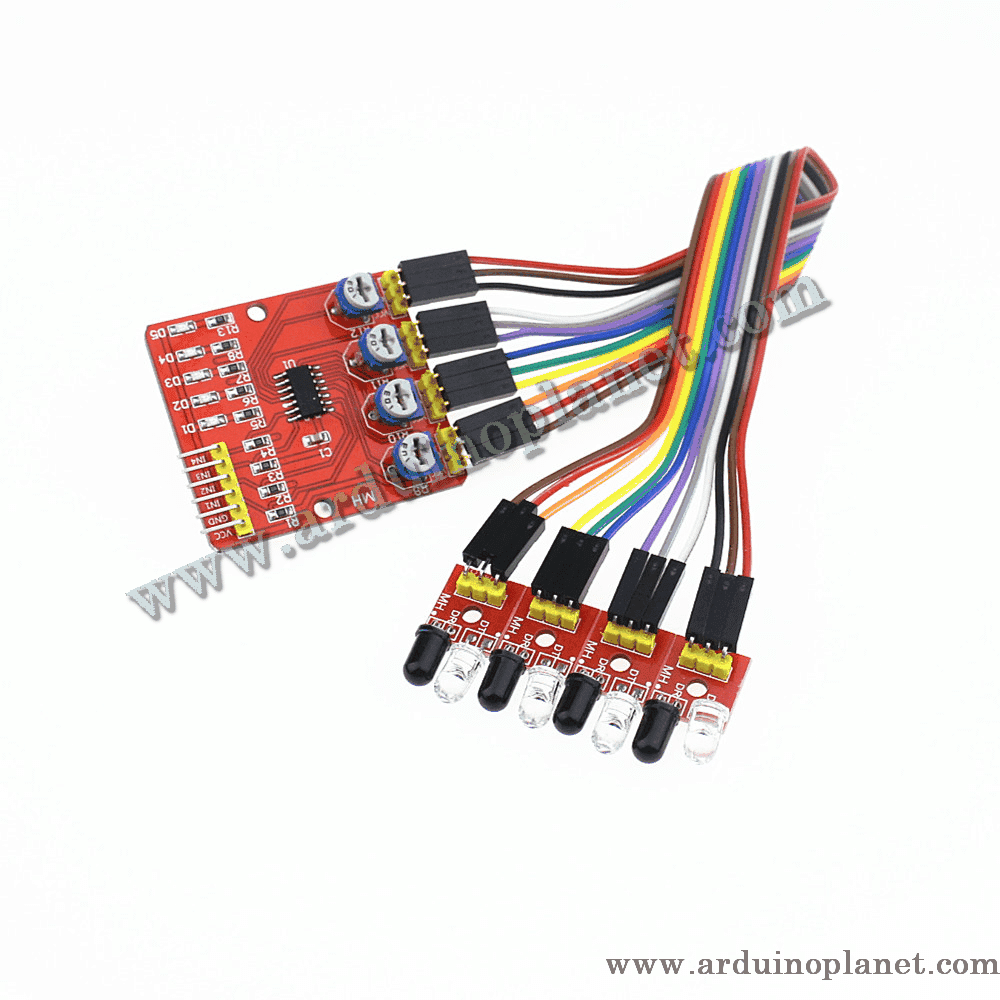
Description
4-Channel Infrared Line-Follower Sensor Module
This four-channel line-follower module uses infrared sensors to detect and follow lines or paths. It is designed for line-following robots and automation projects.
Specifications
- Operating voltage: 3.3–5 V
- Operating current: greater than 1 A (as stated in the source listing; verify the requirement before connecting power)
- Adjustable detection distance: 1 mm to 60 cm (as stated in the source listing)
- Output: TTL digital signal (HIGH/LOW)
- Operating temperature: −10 °C to +50 °C
- Main board dimensions: 42 × 38 × 12 mm
- Individual sensor dimensions: 25 × 12 × 12 mm
- Output interface: 6 wires: four sensor signals, positive supply and ground
How it works
Four infrared emitter/receiver pairs sense the surface below the module. The receivers detect changes in reflected light from black or white lines, and the module converts these changes into digital signals.
Pinout
- VCC: 3.3 V or 5 V supply
- GND: ground
- OUT1–OUT4: digital outputs for sensors 1–4; connect each to an Arduino digital input
Applications
- Line-following and maze-solving robots
- Presence detection and security systems
- Obstacle and surface detection
- Position and object detection in automation projects
Using the module with Arduino Uno
Basic example code
int sensorPins[] = {2, 3, 4, 5}; // Broches connectées aux sorties des capteurs
int ledPin = 13; // Broche connectée à la LED intégrée

void setup() {
for (int i = 0; i < 4; i++) {
pinMode(sensorPins[i], INPUT);
}
pinMode(ledPin, OUTPUT);
Serial.begin(9600);
}

void loop() {
for (int i = 0; i < 4; i++) {
int sensorValue = digitalRead(sensorPins[i]);
Serial.print("Capteur ");
Serial.print(i + 1);
Serial.print(": ");
Serial.println(sensorValue);
}
delay(1000);
}
Advanced example with an I2C LCD
The second example reads the four digital sensor outputs, displays the readings on a 1602 I2C LCD and the serial monitor, and indicates when a sensor detects a line (LOW).
#include <Wire.h>
#include <LiquidCrystal_I2C.h>

int sensorPins[] = {2, 3, 4, 5}; // Broches connectées aux sorties des capteurs
LiquidCrystal_I2C lcd(0x27, 16, 2); // Adresse I2C de l'écran LCD

void setup() {
for (int i = 0; i < 4; i++) {
pinMode(sensorPins[i], INPUT);
}
lcd.begin();
lcd.backlight();
Serial.begin(9600);
}

void loop() {
lcd.setCursor(0, 0);
lcd.print("S1:S2:S3:S4");
lcd.setCursor(0, 1);
for (int i = 0; i < 4; i++) {
int sensorValue = digitalRead(sensorPins[i]);
lcd.print(sensorValue);
lcd.print(" ");
Serial.print("Capteur ");
Serial.print(i + 1);
Serial.print(": ");
Serial.println(sensorValue);
}
delay(1000);
}
Arduino wiring for the digital outputs and LCD
- VCC: Arduino 5 V
- GND: Arduino GND
- OUT1: Arduino digital pin 2
- OUT2: Arduino digital pin 3
- OUT3: Arduino digital pin 4
- OUT4: Arduino digital pin 5
- LCD SDA: Arduino A4
- LCD SCL: Arduino A5
Library installation
- Open the Arduino IDE and select Sketch → Include Library → Manage Libraries.
- Search for
LiquidCrystal_I2Cand install the library by Frank de Brabander.
Keywords: four-channel line follower, infrared sensor array, line tracking, obstacle detection, robotics sensor, TCRT5000.