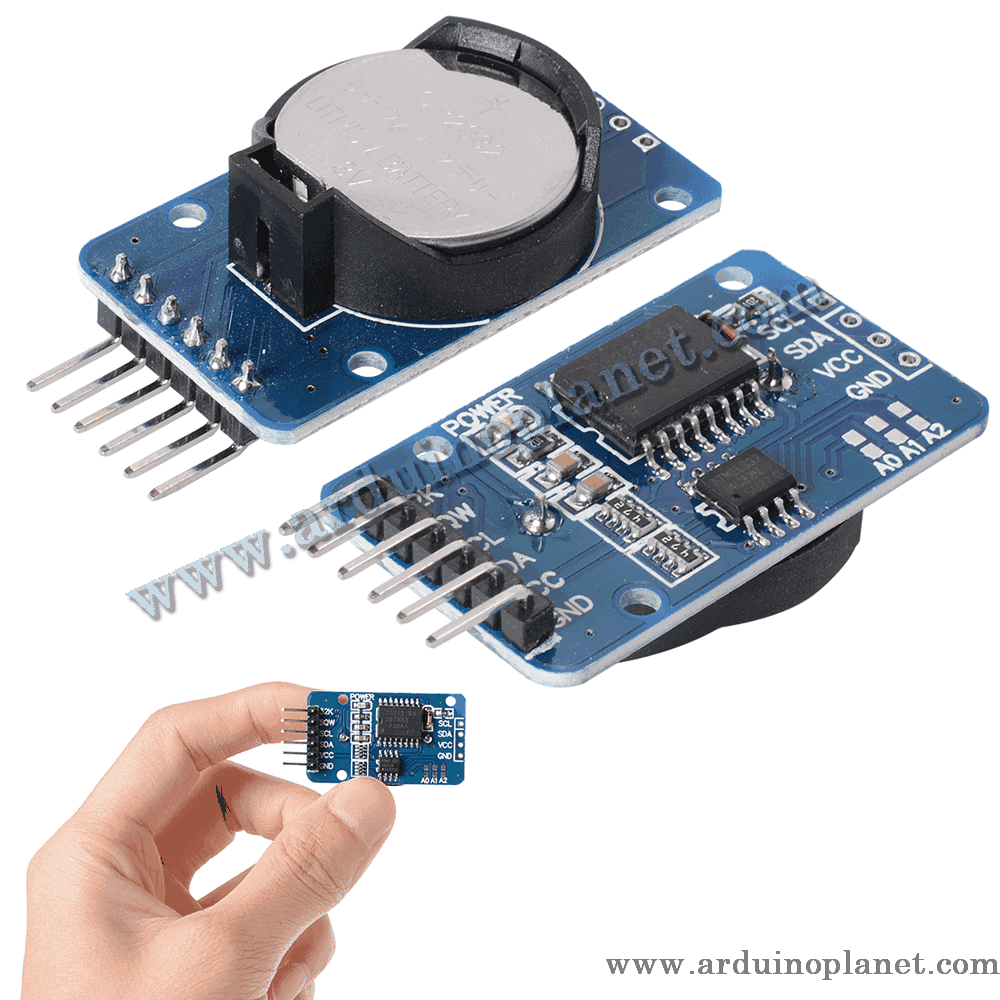
Description
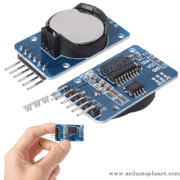
DS3231 RTC Real-Time Clock Module
The DS3231 is a high-accuracy real-time clock (RTC) module that keeps track of the time and date. It includes an integrated temperature-compensated crystal oscillator (TCXO) and a backup battery to keep the clock running during a power interruption.
Detailed specifications
- Operating voltage: 2.3 V to 5.5 V
- Current consumption: < 300 µA during operation; 500 nA in battery-backup mode
- Operating temperature: −45 °C to +80 °C
- Accuracy: ±2 ppm from 0 °C to +40 °C (±1 minute/year)
- Backup battery: CR2032, typical life 2 to 3 years
- Battery: CR2032, not included
- Interface: I2C at 400 kHz
- Functions: seconds, minutes, hours, days, dates, months and years; leap-year handling; two alarms; programmable square-wave output
- Dimensions: 38 × 22 × 14 mm
- Weight: 8 g with battery
How it works
The DS3231 keeps accurate time and date and communicates with a microcontroller over I2C. When the main supply is available, it uses that source and automatically switches to its backup battery if the main power fails, maintaining timekeeping continuity.
Applications
- Digital clocks
- Energy-management systems
- Computer peripherals
- GPS systems
- Industrial automation
Pinout
- VCC: power supply (2.3 V–5.5 V)
- GND: ground
- SDA: serial data (I2C)
- SCL: serial clock (I2C)
- SQW: square-wave output
- 32K: 32 kHz oscillator output
Using the module with Arduino
Connect the module’s VCC, GND, SDA and SCL pins to the corresponding Arduino connections. Use a library such as RTClib to simplify communication.
Using it with Arduino Uno — basic example
What the basic code does
This example initializes the DS3231 and displays the current time and date on the Serial Monitor. If the module has lost power, it sets the time using the sketch’s compilation date and time.
Components for the basic example
- Arduino Uno
- DS3231 RTC module
- Jumper wires
Basic Arduino code
#include <Wire.h> // Inclusion de la bibliothèque Wire pour I2C
#include "RTClib.h" // Inclusion de la bibliothèque RTClib pour le module RTC DS3231


RTC_DS3231 rtc; // Création de l'objet RTC pour le module DS3231


// Constantes
const int DELAY_TIME = 1000; // Délai entre les lectures en millisecondes


void setup() {
  Serial.begin(9600); // Initialiser la communication série à 9600 bauds


  // Vérification de la connexion du module RTC
  if (!rtc.begin()) {
    Serial.println("Couldn't find RTC"); // Afficher un message d'erreur si le module RTC n'est pas trouvé
    while (1); // Arrêter le programme si le RTC n'est pas trouvé
  }


  // Vérification de la perte d'alimentation du RTC
  if (rtc.lostPower()) {
    Serial.println("RTC lost power, lets set the time!"); // Afficher un message si le RTC a perdu l'alimentation
    // Initialiser l'heure avec la date et l'heure de compilation (ajuster pour le fuseau horaire si nécessaire)
    rtc.adjust(DateTime(F(__DATE__), F(__TIME__)));
  }
}


void loop() {
  DateTime now = rtc.now(); // Obtenir l'heure actuelle du RTC


  // Vérification de la validité de la date/heure actuelle
  if (!now.isValid()) {
    Serial.println("Error: Invalid date/time"); // Afficher un message d'erreur si la date/heure est invalide
    return;
  }


  // Affichage de l'heure et de la date actuelles sur le moniteur série
  Serial.print(now.year(), DEC); // Afficher l'année
  Serial.print('/');
  Serial.print(now.month(), DEC); // Afficher le mois
  Serial.print('/');
  Serial.print(now.day(), DEC); // Afficher le jour
  Serial.print(" (");
  Serial.print(daysOfTheWeek[now.dayOfTheWeek()]); // Afficher le jour de la semaine
  Serial.print(") ");
  Serial.print(now.hour(), DEC); // Afficher l'heure
  Serial.print(':');
  Serial.print(now.minute(), DEC); // Afficher les minutes
  Serial.print(':');
  Serial.print(now.second(), DEC); // Afficher les secondes
  Serial.println();


  delay(DELAY_TIME); // Attendre avant la prochaine lecture
}
Explanation of the basic code
- Include libraries:
Wire.handRTClib.henable I2C communication with the DS3231. - Define a constant:
DELAY_TIMEsets the interval between clock readings and display updates. - Create the RTC object:
RTC_DS3231 rtccreates an object for communicating with the module. - In
setup():- Start serial communication at 9600 baud with
Serial.begin(9600). - Check the module connection with
rtc.begin()and report an error if it is not found. - Check for power loss with
rtc.lostPower(); if needed, set the time from the sketch compilation date and time withrtc.adjust(DateTime(F(__DATE__), F(__TIME__))).
- Start serial communication at 9600 baud with
- In
loop():- Read the current time using
rtc.now()and store it inDateTime now. - Check that the date/time is valid with
now.isValid(). - Print the current time and date to the Serial Monitor.
- Wait before the next reading using
delay(DELAY_TIME).
- Read the current time using
Displaying the days of the week
To display weekdays, add a conversion array such as this:
const char* daysOfTheWeek[7] = {"Lundi", "Mardi", "Mercredi", "Jeudi", "Vendredi", "Samedi", "Dimanche"};Basic Arduino Uno wiring
- VCC: connect to the Arduino 5V pin
- GND: connect to Arduino GND
- SDA: connect to Arduino A4
- SCL: connect to Arduino A5
Advanced Arduino example: 7-segment display with error handling
#include <Wire.h>
#include <RTClib.h>
#include <SevSeg.h>


// Constantes
const int DELAY_TIME = 1000; // Délai entre les lectures en millisecondes


RTC_DS3231 rtc; // Définir l'objet RTC
SevSeg sevseg; // Définir l'objet pour l'écran 7 segments


void setup() {
  // Initialisation de la communication série
  Serial.begin(9600);


  // Initialisation de l'écran 7 segments
  byte numDigits = 4;
  byte digitPins[] = {2, 3, 4, 5};
  byte segmentPins[] = {6, 7, 8, 9, 10, 11, 12, 13};
  bool resistorsOnSegments = true;
  bool updateWithDelays = false;
  bool leadingZeros = true;
  bool disableDecPoint = false;


  sevseg.begin(COMMON_CATHODE, numDigits, digitPins, segmentPins, resistorsOnSegments, updateWithDelays, leadingZeros, disableDecPoint);
  sevseg.setBrightness(90);


  // Initialisation du RTC
  if (!rtc.begin()) {
    Serial.println("Erreur : RTC non trouvé");
    while (1); // Arrêter le programme si le RTC n'est pas trouvé
  }


  if (rtc.lostPower()) {
    Serial.println("Le RTC a perdu l'alimentation, réglons l'heure !");
    // Définir l'heure avec la date et l'heure de compilation
    rtc.adjust(DateTime(F(__DATE__), F(__TIME__)));
  }
}


void loop() {
  // Lecture de l'heure actuelle
  DateTime now = rtc.now();


  // Format de l'affichage : HHMM
  int displayTime = now.hour() * 100 + now.minute();
  sevseg.setNumber(displayTime, 2); // Afficher le temps sur 4 chiffres avec 2 chiffres après le point


  // Afficher l'heure et la date sur le moniteur série
  Serial.print("Heure : ");
  Serial.print(now.hour(), DEC);
  Serial.print(':');
  Serial.print(now.minute(), DEC);
  Serial.print(':');
  Serial.print(now.second(), DEC);
  Serial.print(" Date : ");
  Serial.print(now.day(), DEC);
  Serial.print('/');
  Serial.print(now.month(), DEC);
  Serial.print('/');
  Serial.print(now.year(), DEC);
  Serial.println();


  sevseg.refreshDisplay(); // Rafraîchir l'affichage 7 segments
  delay(DELAY_TIME); // Attendre avant la prochaine lecture
}
What the advanced code does
This example reads the time and date from the DS3231 and displays them on a 7-segment display.
Explanation of the advanced code
- Include libraries:
Wire.h,RTClib.handSevSeg.hprovide I2C communication, RTC functions and 7-segment display control. - Set the interval:
DELAY_TIMEdefines the time between RTC readings and display updates. - Initialize serial and display: serial communication starts at 9600 baud; the display is configured for its corresponding pins and common-cathode operation.
- Initialize the RTC: check the module connection and, after a power loss, set the clock using the sketch compilation date and time.
- Read and display values: read the time, format it for the 7-segment display, and also print the time and date to the Serial Monitor.
- Refresh the display: show the time in HHMM format and refresh the display on each
loop()iteration.
Components for the advanced example
- Arduino Uno
- DS3231 RTC module
- 7-segment display (12 pins, common cathode, 4 digits with 2 decimal points)
- Jumper wires
Detailed wiring: DS3231 RTC and 7-segment display
Connect the DS3231 and 7-segment display to an Arduino Uno as follows.
DS3231 RTC connections
- VCC: Arduino Uno 5V
- GND: Arduino Uno GND
- SDA: Arduino Uno A4 (I2C data)
- SCL: Arduino Uno A5 (I2C clock)
7-segment display connections (common cathode, 4 digits, 2 decimal points)
- Digit 1 (pin 1): Arduino Uno pin 2
- Digit 2 (pin 2): Arduino Uno pin 3
- Digit 3 (pin 6): Arduino Uno pin 4
- Digit 4 (pin 8): Arduino Uno pin 5
- Segment A (pin 14): Arduino Uno pin 6
- Segment B (pin 16): Arduino Uno pin 7
- Segment C (pin 13): Arduino Uno pin 8
- Segment D (pin 3): Arduino Uno pin 9
- Segment E (pin 5): Arduino Uno pin 10
- Segment F (pin 11): Arduino Uno pin 11
- Segment G (pin 15): Arduino Uno pin 12
- Decimal point DP (pin 9): Arduino Uno pin 13 (optional)
Notes
- Check your 7-segment display’s datasheet because pin assignments can vary by model.
- Use suitable resistors to limit segment current, typically 220 Ω to 330 Ω.
- Check connection polarity to avoid damaging components.
Installing the libraries
For the basic and advanced examples, install RTClib through the Arduino IDE Library Manager. For the 7-segment example, also install SevSeg:
- Open the Arduino IDE.
- Choose Sketch → Include Library → Manage Libraries…
- Search for
RTClibandSevSeg, then select Install.
Datasheet
DS3231 RTC datasheet
Keywords: real-time clock, RTC, I2C, clock accuracy, battery backup, DS3231 module, timestamp, temperature compensated.