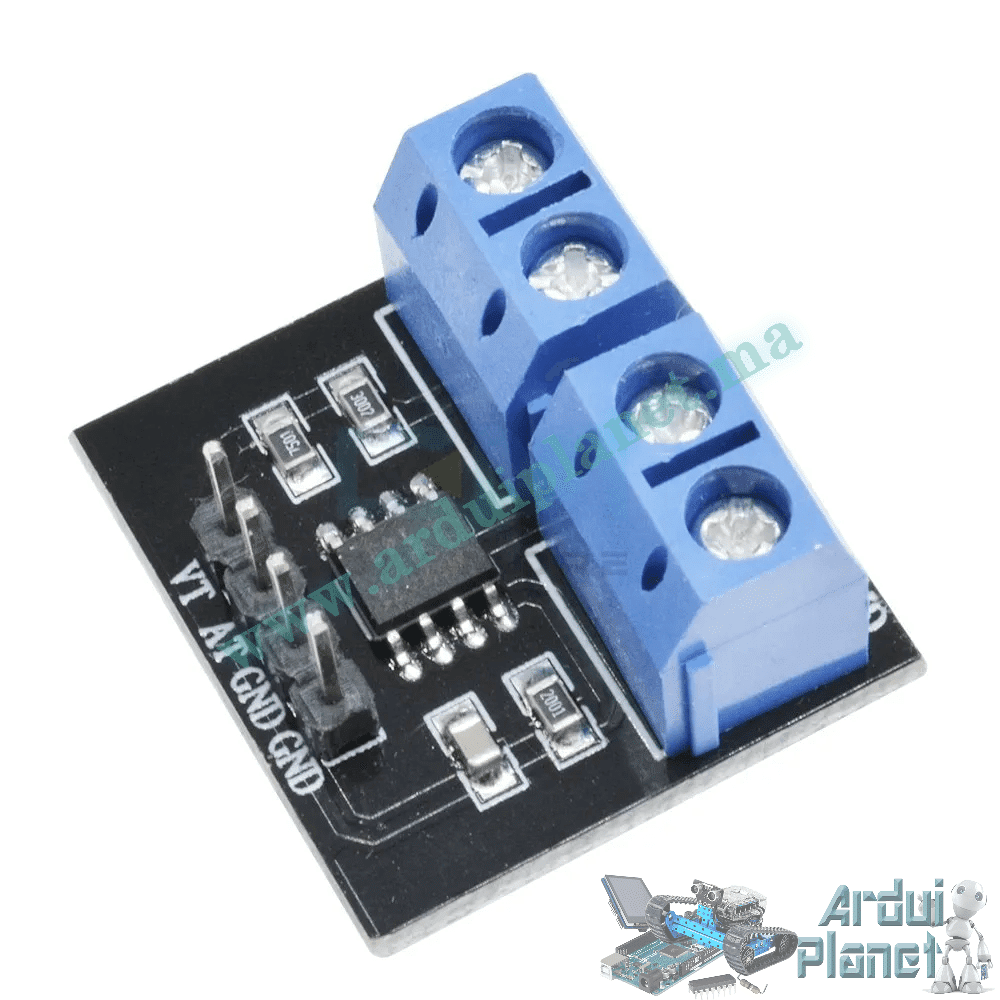
Description
MAX471 Current and Voltage Sensor Module
Select the Voltage version or the Voltage / Current version. The listing describes a module for measuring DC voltage and current, with analog outputs for connection to a microcontroller.
⚠️ Important correction and rating note
The MAX471 is a precision high-side current-sense amplifier, not a Hall-effect sensor. Its manufacturer specifies a bidirectional current-sensing range up to ±3 A and operation from 3 V to 36 V. The MAX471 is intended for DC/battery current sensing; do not rely on the source listing’s claim that it measures AC current. The manufacturer’s datasheet describes a 500 μA/A current output; a 2 kΩ output resistor gives a nominal 1 V/A conversion. The attached module may add circuitry, so verify its actual output scaling.
The product title lists voltage measurement up to 25 V, while the example code uses a 0–36 V divider factor. These figures conflict. Confirm the exact board’s voltage-divider ratio and maximum input voltage before connecting it; do not assume the code supports 36 V. The listing’s ±1.5% accuracy is not independently verified for the complete module.
🔧 Listed module specifications
- Module supply: listed as 3–36 V DC for the sensor circuit; verify the board’s VCC requirement
- Current measurement: −3 A to +3 A (listing and MAX471 range)
- Current output: listed scaling of 1 V/A; actual scaling depends on the board’s output resistor/circuit
- Voltage measurement: listed up to 25 V; confirm the hardware divider before use
- Analog outputs: current and voltage signals, depending on selected version
- Operating temperature: −40 °C to 85 °C (listing)
⚙️ How it works
The MAX471 senses voltage drop across its internal current-sense resistor and produces a current-proportional output. The module’s voltage-sensing section uses a separate divider/output path. It is not a Hall-effect isolation module.
💡 Applications
- DC battery charge/discharge monitoring
- Low-voltage supply and load experiments
- Motor current monitoring within the module rating
- Robotics and electronics prototypes
- Microcontroller measurement projects
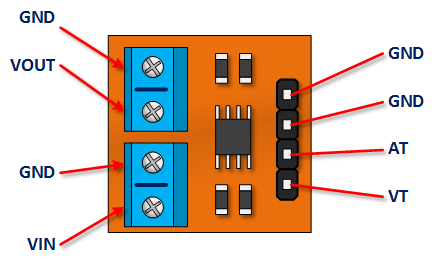
📌 Board terminals and signals
- AT: listed analog voltage-measurement output
- VT: listed analog current-measurement output
- VIN / GND: voltage input terminals
- VOUT / GND: voltage output terminals shown in the listing
- GND: board ground (the listing shows multiple ground points)
Terminal names can vary by board revision. Use the labels printed on the supplied board and the included diagrams; confirm which pins are outputs and which are input terminals before wiring. Keep the Arduino analog input within its allowed voltage range.
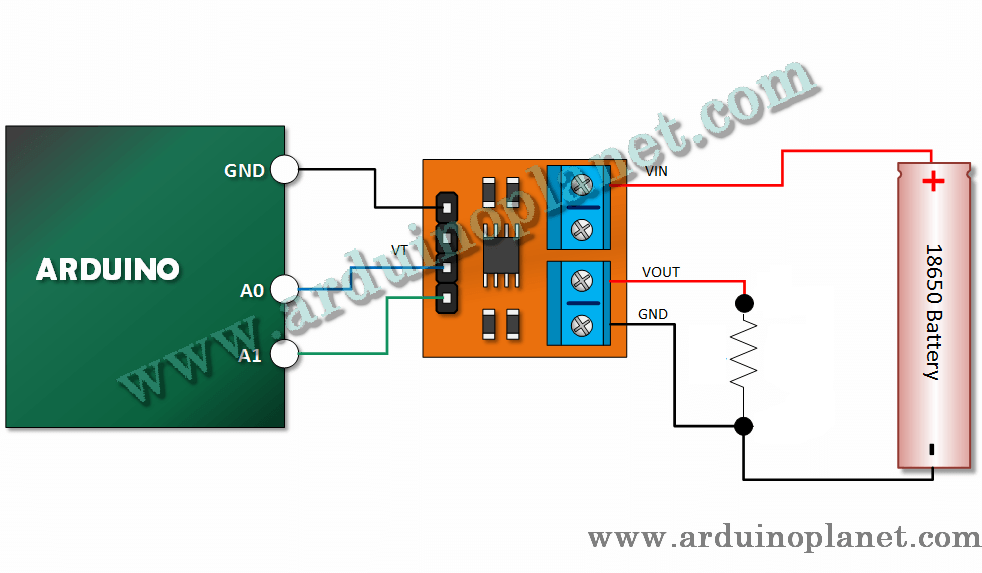
🔌 Basic Arduino Uno example
The source listing’s original code is preserved below. The current and voltage conversion factors are assumptions from that listing; calibrate them against the exact board and a suitable reference meter before relying on readings.
#define CURRENT_SENSOR_PIN A0
#define VOLTAGE_SENSOR_PIN A1

void setup() {
Serial.begin(9600);
}

void loop() {
int currentSensorValue = analogRead(CURRENT_SENSOR_PIN);
int voltageSensorValue = analogRead(VOLTAGE_SENSOR_PIN);
float current = currentSensorValue * (5.0 / 1023.0); // 1V/A
float voltage = voltageSensorValue * (5.0 / 1023.0) * (36.0 / 5.0); // Calibration for 0-36V range
Serial.print("Current: ");
Serial.print(current);
Serial.print(" A, Voltage: ");
Serial.print(voltage);
Serial.println(" V");
delay(1000);
}
What the basic code does
The sketch reads the current and voltage analog channels, estimates their values using the configured conversion factors, and prints them to the serial monitor.
📟 Advanced Arduino example: LCD and serial monitor
The original advanced code is preserved below. Install a compatible LiquidCrystal_I2C library and check its API for your installed version.
#include <LiquidCrystal_I2C.h>


// Constants
const float V_REF = 5.0;
const int ADC_RESOLUTION = 1023;
const float CURRENT_SENSITIVITY = 1.0; // Sensibilité du module : 1V/A
const float VOLTAGE_CALIBRATION = (36.0 / 5.0); // Calibration pour la tension mesurée
const int CURRENT_SENSOR_PIN = A0;
const int VOLTAGE_SENSOR_PIN = A1;


LiquidCrystal_I2C lcd(0x27, 16, 2);


void setup() {
  lcd.begin();
  lcd.backlight();
  Serial.begin(9600);
}


void readSensorValues(int& currentSensorValue, int& voltageSensorValue) {
  currentSensorValue = analogRead(CURRENT_SENSOR_PIN);
  voltageSensorValue = analogRead(VOLTAGE_SENSOR_PIN);
}


float calculateCurrent(int currentSensorValue) {
  return currentSensorValue * (V_REF / ADC_RESOLUTION) * CURRENT_SENSITIVITY;
}


float calculateVoltage(int voltageSensorValue) {
  return voltageSensorValue * (V_REF / ADC_RESOLUTION) * VOLTAGE_CALIBRATION;
}


void displayValuesOnLCD(float current, float voltage) {
  lcd.clear();
  lcd.setCursor(0, 0);
  lcd.print("Current: ");
  lcd.print(current, 2); // Affiche le courant avec 2 décimales
  lcd.print(" A");
  lcd.setCursor(0, 1);
  lcd.print("Voltage: ");
  lcd.print(voltage, 2); // Affiche la tension avec 2 décimales
  lcd.print(" V");
}


void displayValuesOnSerialConsole(float current, float voltage) {
  Serial.print("Current: ");
  Serial.print(current, 2);
  Serial.print(" A, Voltage: ");
  Serial.print(voltage, 2);
  Serial.println(" V");
}


void loop() {
  int currentSensorValue, voltageSensorValue;
  readSensorValues(currentSensorValue, voltageSensorValue);
  float current = calculateCurrent(currentSensorValue);
  float voltage = calculateVoltage(voltageSensorValue);
  displayValuesOnLCD(current, voltage);
  displayValuesOnSerialConsole(current, voltage);
  delay(1000);
}
What the advanced code does
The sketch reads both analog outputs, calculates estimated current and voltage, and displays the results on a 16×2 I2C LCD and the serial monitor.
Example components and connections
- Arduino Uno
- MAX471 module in the selected configuration
- 1602 I2C LCD for the advanced example
- Connecting wires
- Sensor outputs to Arduino A0 and A1 as shown in the source examples
- LCD SDA / SCL to A4 / A5 on an Arduino Uno
The example calculations assume a 5 V ADC reference and a 10-bit reading. Real readings also depend on ADC reference accuracy, zero offset, output resistor, voltage-divider ratio and board tolerances. Do not connect a voltage above the verified divider rating. This module is not a safety-rated interface for mains voltage.
📚 Library
No dedicated MAX471 library is needed for analog readings. The LCD example uses LiquidCrystal_I2C, available through the Arduino IDE Library Manager.