Description
ZMPT101B AC Voltage Sensor Module
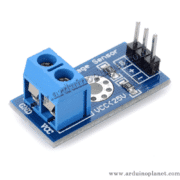
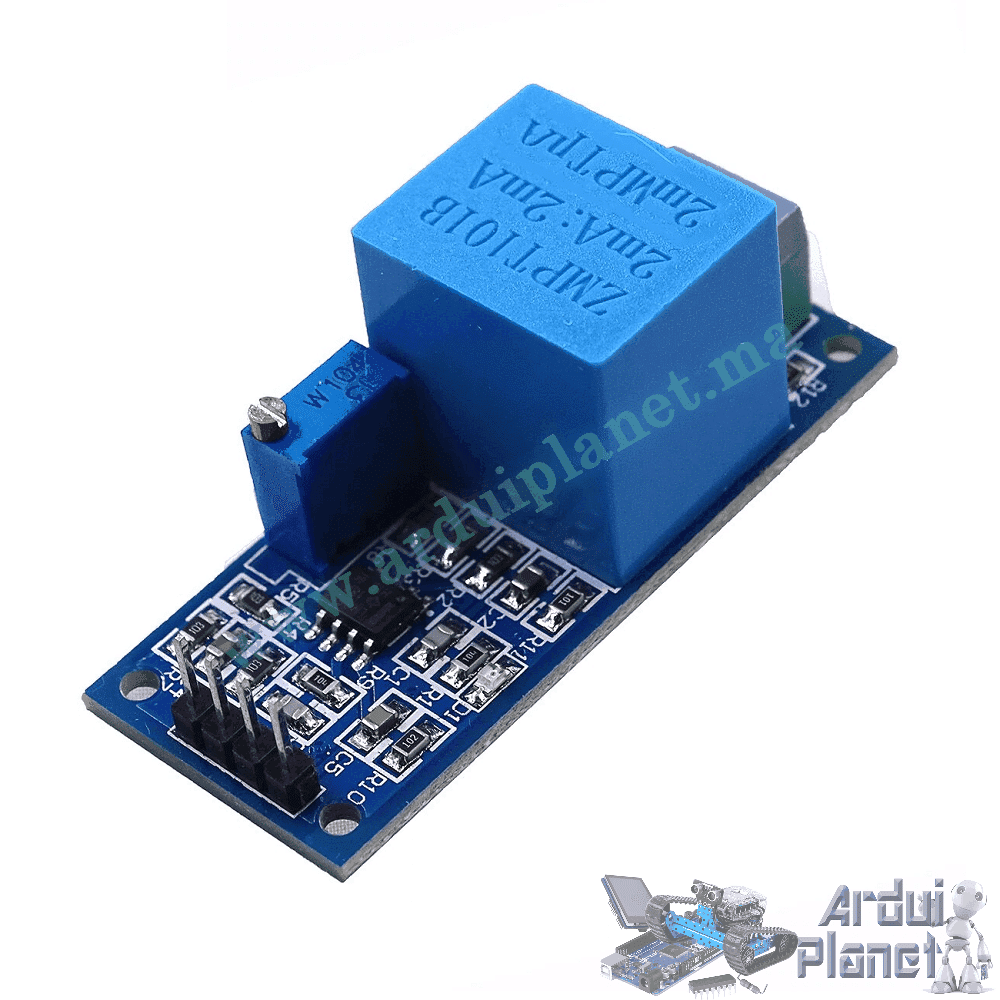
The ZMPT101B module is described as an AC voltage sensor using a voltage transformer and amplifier circuit to provide an analog output proportional to the measured signal. The source claims measurement up to 250V AC.
Specifications stated by the source
- Input: 0–250V AC (source-stated)
- Output: analog signal, stated as 0–5V
- Supply: 5–30V DC (source-stated)
- Operating temperature: -40 to 70°C
- Multi-turn potentiometer for output adjustment
- Compact PCB-mounting module
The module uses a voltage transformer to reduce the sampled AC signal, followed by a resistive divider and operational amplifier. The multi-turn potentiometer adjusts the output for the input being measured.
Applications
- AC voltage monitoring
- Home automation projects
- Energy monitoring prototypes
- Power-failure detection
- Power analysis and control
Connections
- VCC: module supply (the source wiring example uses 5V)
- OUT: analog output
- GND: ground
- Two-pin terminal: AC input (VIN+ and VIN− in the source example)
For the Arduino Uno example, the source connects VCC to 5V, GND to ground and OUT to an analog input such as A0. The AC terminal is connected to the voltage being measured.
Basic Arduino example
The source provides this example for reading the module and printing a value:
#define VOLTAGE_SENSOR_PIN A0


void setup() {
  Serial.begin(9600);
}


void loop() {
  int sensorValue = analogRead(VOLTAGE_SENSOR_PIN);
  float voltage = (sensorValue / 1023.0) * 250.0; // Conversion pour 250V AC
  Serial.print("Voltage: ");
  Serial.print(voltage);
  Serial.println(" V");
  delay(1000);
}
What the basic code does
It reads the analog input and scales the reading using a 250V constant. This is only an illustrative mapping: it does not calculate true RMS voltage or establish a calibrated measurement. Do not treat the displayed value as an accurate or safety-rated mains reading.
Basic example components
- Arduino Uno
- ZMPT101B voltage sensor module
- Connecting wires
Basic example connections
- VCC: Arduino 5V
- GND: Arduino ground
- OUT: Arduino A0
- VIN+ and VIN−: AC input terminals
Advanced example with I2C LCD
The source also provides a longer example intended to display readings on an I2C LCD and the serial console:
#include <LiquidCrystal_I2C.h> // Inclusion de la bibliothèque pour l'écran LCD I2C

// Constantes
const float V_REF = 5.0; // Tension de référence de l'Arduino
const int ADC_RESOLUTION = 1023; // Résolution de l'ADC de l'Arduino
const float VOLTAGE_RANGE = 250.0; // Plage de tension mesurée par le capteur
const int VOLTAGE_SENSOR_PIN = A0; // Broche de connexion du capteur de tension
const int DELAY_TIME = 1000; // Délai entre les lectures en millisecondes

LiquidCrystal_I2C lcd(0x27, 16, 2); // Initialisation de l'écran LCD I2C avec l'adresse 0x27 et une taille de 16x2

void setup() {
lcd.begin(); // Initialisation de l'écran LCD
lcd.backlight(); // Allumer le rétroéclairage de l'écran LCD
Serial.begin(9600); // Initialisation de la communication série à 9600 bauds
}

// Fonction pour lire la valeur du capteur de tension
void readSensorValue(int& sensorValue) {
sensorValue = analogRead(VOLTAGE_SENSOR_PIN); // Lire la valeur analogique du capteur
}

// Fonction pour calculer la tension mesurée à partir de la valeur du capteur
float calculateVoltage(int sensorValue) {
if (ADC_RESOLUTION == 0) { // Vérification pour éviter la division par zéro
Serial.println("Erreur: ADC_RESOLUTION est zéro.");
return 0.0;
}

float adc_voltage = sensorValue * (V_REF / ADC_RESOLUTION); // Calcul de la tension ADC
float voltage = adc_voltage * VOLTAGE_RANGE / V_REF; // Conversion de la tension ADC à la tension réelle

if (voltage > VOLTAGE_RANGE) { // Vérification si la tension dépasse la plage maximale
Serial.println("Erreur: Tension hors plage.");
return 0.0;
}

return voltage; // Retourne la tension calculée
}

// Fonction pour afficher les valeurs sur l'écran LCD
void displayValuesOnLCD(float voltage) {
static float lastVoltage = -1.0; // Variable pour stocker la dernière valeur de tension affichée

if (voltage != lastVoltage) { // Met à jour l'affichage uniquement si la valeur a changé
lcd.clear(); // Efface l'écran LCD
lcd.setCursor(0, 0); // Positionne le curseur à la première ligne
lcd.print("Voltage: "); // Affiche le texte "Voltage: "
lcd.print(voltage, 2); // Affiche la valeur de la tension avec 2 décimales
lcd.print(" V"); // Affiche l'unité de tension "V"
lastVoltage = voltage; // Met à jour la dernière valeur de tension affichée
}
}

// Fonction pour afficher les valeurs sur la console série
void displayValuesOnSerialConsole(float voltage) {
Serial.print("Voltage: "); // Affiche le texte "Voltage: " sur la console série
Serial.print(voltage, 2); // Affiche la valeur de la tension avec 2 décimales
Serial.println(" V"); // Affiche l'unité de tension "V" et passe à la ligne suivante
}

void loop() {
int sensorValue;
readSensorValue(sensorValue); // Lire la valeur du capteur de tension
float voltage = calculateVoltage(sensorValue); // Calculer la tension réelle
displayValuesOnLCD(voltage); // Afficher la tension sur l'écran LCD
displayValuesOnSerialConsole(voltage); // Afficher la tension sur la console série
delay(DELAY_TIME); // Attendre avant de refaire une lecture
}
What the advanced code is intended to do
The source describes code that initializes an I2C LCD and serial output, reads the analog sensor signal, calculates and displays a voltage value, and repeats the reading. The code and conversion require review and calibration for the exact module, ADC reference, waveform and input range; they are not a verified true-RMS measurement method.
Advanced example components
- Arduino Uno
- ZMPT101B voltage sensor module
- 1602 I2C LCD
- Connecting wires
Electrical safety: measuring mains voltage can cause fatal electric shock or fire. The source examples are not safety instructions. Mains connections must be designed and handled by a qualified person using an appropriately rated enclosure, isolation, clearances, fusing and measurement equipment. Never handle exposed live wiring or connect an exposed mains circuit to a computer.